Showing posts with label 3D. Show all posts

Monday, October 5, 2015

Live Texturing of Augmented Reality Characters from Colored Drawings

I think this is amazing. Love the potential implications of such tech.

  ▣
Click here to see Monday-only posts.

Tuesday, August 19, 2014

Real-Time Projection Mapped Facial Effects

OMOTE / REAL-TIME FACE TRACKING & PROJECTION MAPPING. from something wonderful on Vimeo.

PROJECT MEMBERS

NOBUMICHI ASAI (PLANNER / PRODUCER / TECHNICAL PRODUCER - P.I.C.S.)
HIROTO KUWAHARA (ART DIRECTOR & MAKEUP)
PAUL LACROIX (TECHNICAL DIRECTOR / PROGRAMMER - TRANSIT DIGITAL WORKS)
JIN HASEGAWA (CG DESIGNER - SPADE)
TAKASHI ISHIBASHI (CG DESIGNER - SPADE)
AYAKA MOTOYOSHI (PRODUCTION MANAGER - P.I.C.S.)

SPECIAL THANKS

AYA KUMAKURA (PRODUCTION MANAGER)
YOSHIHIRO UENO (PRODUCTION MANAGER - P.I.C.S.)
KOJI KOJIMA(PRODUCER)
KAZUHIRO NAKAMURA (COLORIST - McRAY)
KENJI NAKAZONO (PHOTOGRAPHER - CREATIVE STUDIO WORKS)
KIMIHIRO MORIKAWA (PHOTOGRAPHER - SHOOTING & LIGHTING)
JIN HASEGAWA(SPADE)
RHEA TOR’S INC.
DAN (STYLIST)
K.FURUMOTO (HAIR - &´S MANAGEMENT)
YUKA SEKIMIZU (MODEL - SATORU JAPAN)
HIDEAKI TAKAHASHI(MUSIC - mjuc)

CONTACT
NOBUMICHIASAI.COM
  ▣
Click here to see Tuesday-only posts.

Tuesday, March 31, 2009

Tip Tuesday - Google Sketchup

Most things from Google are free, Sketchup is no different. With Sketchup you can create 3D models of pretty much anything: Landscaping, renovation, new architecture, to virtually redecorate your place, something you're building, plus much much more.

You can build them from scratch, or you can search this massive directory of models. Yes, you do have to download the software, but it's compatible with PCs and Macs; and the Pro version is available free for schools.

Kids can have fun too. There are puzzles and mosaics all free.

Video tutorials
are available to show you how to place the models you make in Sketchup into Google Earth. There are instructions here as well.

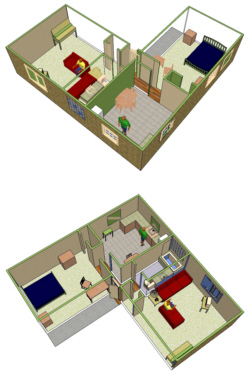
The apartment model on the right was made by an elementary student as part of a Sketchup K-12 Education community. Find out more here.

There's a Sketchup community, Sketchucation community forums and a Google Sketchup teacher guide to help you. This self-paced tutorial comes in highly recommended too.

Personally, I think I may try to do this to help me with some backyard plans I have (where to put the shed, where to plan specific treets, they layout, and even an herb & vegetable garden).

How are you using Sketchup? Tell me in the comments.